Thermometer to Print
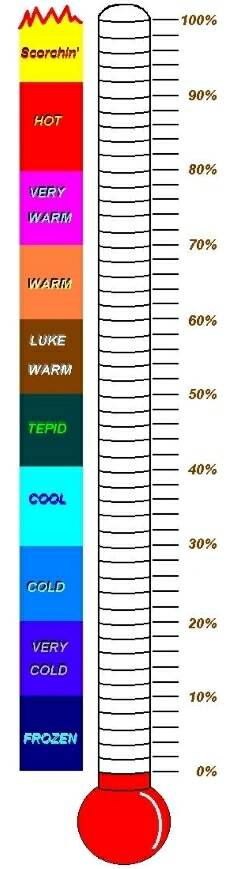
If you only want to Print the thermometer
- Highlight the thermometer (put your cursor to the right of the
thermometer
and then move the cursor, while holding down the left push button on your
mouse, over the
thermometer pic.....it will highlight ONLY the thermometer)
and then go to "File" in the uppermost left
corner and click on
it - then click on Print. After the Print menu opens choose Selection
and then click
OK - only the highlighted item will print up. This works for anything you want to print up on the Internet
or anywhere!
You can also right click on the thermometer
and save it to your hard drive by clicking on "Save Picture As"
and placing it in a folder of your choice on your hard drive. You can
then open it and print it up from there.
How to fill in the lines:
1. On the 0% line write down your starting weight.
2 On the 100% line write your desired ending weight.
3. Subtract the ending weight from the starting weight. This is your desired
weight loss. Write it down
on a separate piece of paper.
4. Each of the individual lines represents 2% of your total weight loss. Multiply
your desired weight loss
by 0.02. Write down the result on your scratch paper.
We will call this value the 2% value.
5. Now, subtract the 2% value you found in step four from your Starting weight.
Write the result down
on the line right above the line you wrote your Starting
weight on.
6. For each line, all the way up, subtract the 2% value from the line which
is already filled in, and then
write the result on the line directly above
it. Continue this until you reach the top.
Example:
If you weigh 165 pounds and your goal weight is 135 pounds then this is how
you would fill in the chart:
1. Write 165 down on the 0% line.
2. Write 135 down on the 100% line
3. Subtract 135 from 165 and you get 30 pounds
4. Multiply 30 pounds times 0.02 and you get 0.6.
5. Subtract 0.6 from 165, which gives you 164.4. Write that down on the second
line.
6. Subtract 0.6 from 164.4, which gives you 163.8. Write that down on the
third line. Continue subtracting
0.6 from each line and write the result on
the line above it. The final result will be:
135.0 - 100%
135.6
136.2
136.8
137.4
138.0 - 90%
138.6
139.2
139.8
140.4
141.0 - 80%
141.6
142.2
142.8
143.4
144.0 - 70%
144.6
145.2
145.8
146.4
147.0 - 60%
147.6
148.2
148.8
149.4
150.0 - 50%
150.6
151.2
151.8
152.4
153.0 - 40%
153.6
154.2
154.8
155.4
156.0 - 30%
156.6
157.2
157.8
158.4
159.0 - 20%
159.6
160.2
160.8
161.4
162.0 - 10%
162.6
163.2
163.8
164.4
165.0 - 0%
I only used this tool for my losses - cannot show gains on this! Another way
to fill this in is to put your starting
weight at the bottom and put in 1
lb. for every line (I used two of these - one went from 233 lbs to 185 lbs
-
then the second one was 184 lbs to 135 lbs) - this way you aren't always
looking at the BIG picture, if you
have a lot to lose like I did. I
filled in the thermometer with a yellow highlighter as I lost (wrote the date
it and
circled the weight next to it). My very loving husband, Al, drew
this.
Return to DWLZ Weightloss Tools Page